# Add Some Style to Your JavaScript Log
| key | value |
| --- | --- |
| url | https://www.frobiovox.com/posts/2015/09/10/add-some-style-to-your-javascript-log/ |
| date | 2015-09-10 |
| tags | frontpage, tutorial, browsers, debug |
| description | Style can be passed as a parameter to the console.log function. |
Did you know that ```console.log``` can render styled text? Colors, drop shadows, custom fonts -- all in your browser's developer console. This post shows you how it is done and what it looks like across browsers.
Skip to the how-to
## Backstory
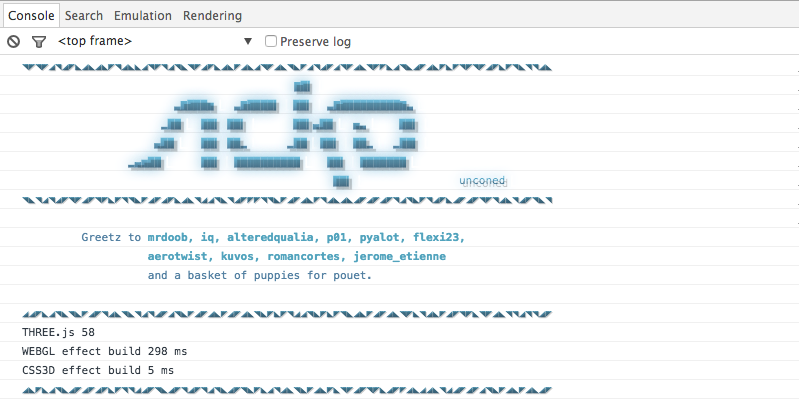
Anytime I want to show off what the web can do with a simple blog I have to pull up [this awesome site](http://acko.net). I was on [A Very Cool Site about Hackery, Math & Design](http://acko.net/), and the question was asked "how did he do that?"
So it was time to open my console. This is what I found.
Which lead to the question "how did he do that?"
# How **_that_** is done.
I you are not aware already, there are quite a few methods available in the global ```console``` object. If you are not familiar I recommend the [Mozilla Developer Network pages on ```console```](https://developer.mozilla.org/en-US/docs/Web/API/consol). Some methods of importance are:
- log (_duh_)
- assert
- trace
- error
- count
These are old news and I won't go into them in detail here. Just look them up on the [MDN docs](https://developer.mozilla.org/en-US/docs/Web/API/consol).
## So then how was it done?
Scroll ahead to the [Outputting Text to the console](https://developer.mozilla.org/en-US/docs/Web/API/console#Outputting_text_to_the_console) portion of the MDN doc and you will see that ```console.log``` will take in its first parameter some string wrappers. ```%f``` for float, ```%s``` for string, and so on. At the very bottom of the page you will see the ```%c```, which wrapps the remaining text in some style as the second parameter.
```js
console.log("%cHello", "color: red;");
```
Will render as:
Hello
### Results across browsers
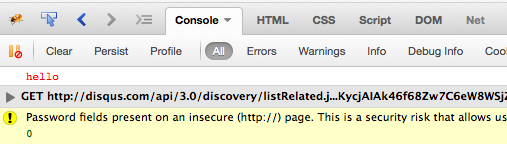
In the console. From the screen shots below you will see that this works will all modern browsers (although, I don't have direct access to a PC with IE or Edge at the moment, but I will assume they work too).
**Chrome**
**Firefox Inspector**
**Firefox Firebug**
#### Appendix
This doesn't work in Edge.
Styled console output is a small thing, but it is useful for making important debug messages stand out in a noisy log. Library authors use it to brand their console output, and you can use it to highlight warnings or status messages during development. The ```%c``` format specifier is the key -- everything after it gets the CSS you pass as the next argument.
 Which lead to the question "how did he do that?"
# How **_that_** is done.
I you are not aware already, there are quite a few methods available in the global ```console``` object. If you are not familiar I recommend the [Mozilla Developer Network pages on ```console```](https://developer.mozilla.org/en-US/docs/Web/API/consol). Some methods of importance are:
- log (_duh_)
- assert
- trace
- error
- count
These are old news and I won't go into them in detail here. Just look them up on the [MDN docs](https://developer.mozilla.org/en-US/docs/Web/API/consol).
## So then how was it done?
Scroll ahead to the
Which lead to the question "how did he do that?"
# How **_that_** is done.
I you are not aware already, there are quite a few methods available in the global ```console``` object. If you are not familiar I recommend the [Mozilla Developer Network pages on ```console```](https://developer.mozilla.org/en-US/docs/Web/API/consol). Some methods of importance are:
- log (_duh_)
- assert
- trace
- error
- count
These are old news and I won't go into them in detail here. Just look them up on the [MDN docs](https://developer.mozilla.org/en-US/docs/Web/API/consol).
## So then how was it done?
Scroll ahead to the 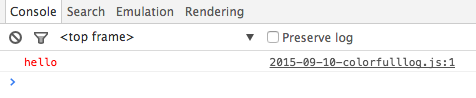 **Firefox Inspector**
 **Firefox Firebug**
 #### Appendix
This doesn't work in Edge.
Styled console output is a small thing, but it is useful for making important debug messages stand out in a noisy log. Library authors use it to brand their console output, and you can use it to highlight warnings or status messages during development. The ```%c``` format specifier is the key -- everything after it gets the CSS you pass as the next argument.
#### Appendix
This doesn't work in Edge.
Styled console output is a small thing, but it is useful for making important debug messages stand out in a noisy log. Library authors use it to brand their console output, and you can use it to highlight warnings or status messages during development. The ```%c``` format specifier is the key -- everything after it gets the CSS you pass as the next argument.