
Working with Case Sensitive Files in a Case Insensitive world
TL;DR: Create a disk image that has a case sensitive file system. Then mount the disk image and work from it.
Bonus points if you also symlink the mount to your normal working directory so that you do not have to change your workflow.
The Problem
On our servers the file systems are case-sensitive, however, on our local development machines (MacOS/OSX) we have case-insensitive file systems. This means files can exist on the server that, when we spin up a local copy, cannot exist on our local systems. If these files are version controlled, svn or git will try its best to resolve these issues but they will generally do a poor job.
We can fix this by not using case-sensitive file names, but this isn’t always possible. For example, when we are dealing with user content. The user will name different files foo.doc, Foo.doc, and FoO.doc. And they will need each of those files.
To solve this I have created a DMG disk image on my system that uses a case-sensitive file system. I then clone my repo into this DMG and mount it on my system. Then I use a symlink to make my system think the files are local.
By doing this I don’t need to worry about changing my workflow and I don’t have to worry about file name collisions.
Creating the disk image on MacOS/OSX
On MacOS/OSX we can use Disk Utility to create a disk image and mount it as a volume. This can be done with hdiutil on the command line:
hdiutil create -size 10m -fs "Case-sensitive HFS+" -volname Test Test.dmg
Or using Disk Utility in the GUI:
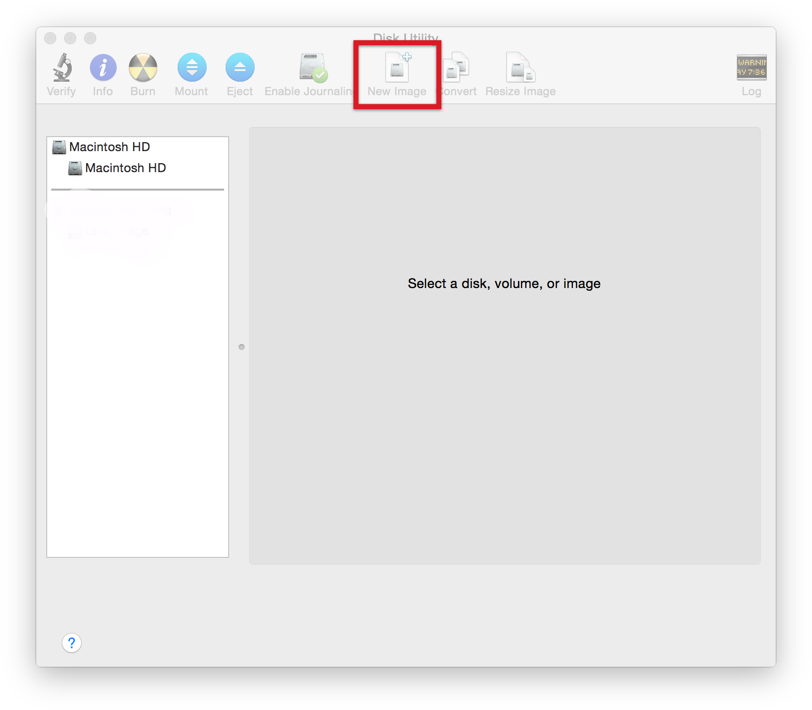
Open Disk Utility and click the new image button.
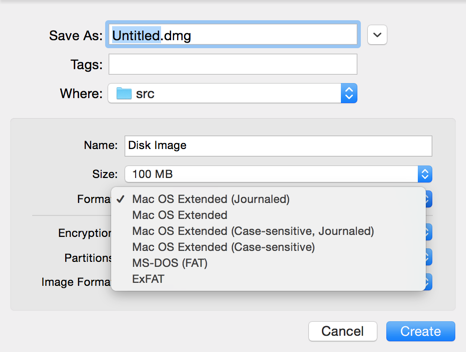
Then select a case sensitive file format.
Bonus Points, symlinking the mounted volume
If you do not know what symlinks are then I suggest you read up on that. In short, all files are some sort of symlink. All files need at least one hard link, but we are going to make a soft link. A soft link is like a shortcut to a file or directory. It will look and act like a file or directory but it is actually pointing to a hard link of another file or directory.
$ ln -s /Volumes/Disk\\ Image/project-folder local-project-folder
This will create a symlink (that looks like a local directory) to our mounted volume in our current directory.
With this setup you get the best of both worlds: a case-sensitive file system for your project and a workflow that looks and feels exactly like working from your normal directory. No more surprises when deploying files to a case-sensitive server.