# Working with Case Sensitive Files in a Case Insensitive world
| key | value |
| --- | --- |
| url | https://www.frobiovox.com/posts/2016/01/20/working-with-case-sensitive-files-in-a-case-insensitive-world/ |
| date | 2016-01-20 |
| tags | frontpage, tutorial |
| description | How to work with case sensitive files on a file system that is case insensitive |
TL;DR: Create a disk image that has a case sensitive file system. Then mount the disk image and work from it.
> Bonus points if you also symlink the mount to your normal working directory so that you do not have to change your workflow.
## The Problem
On our servers the file systems are case-sensitive, however, on our local development machines (MacOS/OSX) we have case-insensitive file systems. This means files can exist on the server that, when we spin up a local copy, cannot exist on our local systems. If these files are version controlled, svn or git will try its best to resolve these issues but they will generally do a poor job.
We can fix this by not using case-sensitive file names, but this isn't always possible. For example, when we are dealing with user content. The user will name different files ```foo.doc```, ```Foo.doc```, and ```FoO.doc```. And they will need each of those files.
To solve this I have created a DMG disk image on my system that uses a case-sensitive file system. I then clone my repo into this DMG and mount it on my system. Then I use a symlink to make my system think the files are local.
By doing this I don't need to worry about changing my workflow and I don't have to worry about file name collisions.
## Creating the disk image on MacOS/OSX
On MacOS/OSX we can use Disk Utility to create a disk image and mount it as a volume. This can be done with [hdiutil on the command line](https://developer.apple.com/library/mac/documentation/Darwin/Reference/ManPages/man1/hdiutil.1.html):
```bash
hdiutil create -size 10m -fs "Case-sensitive HFS+" -volname Test Test.dmg
```
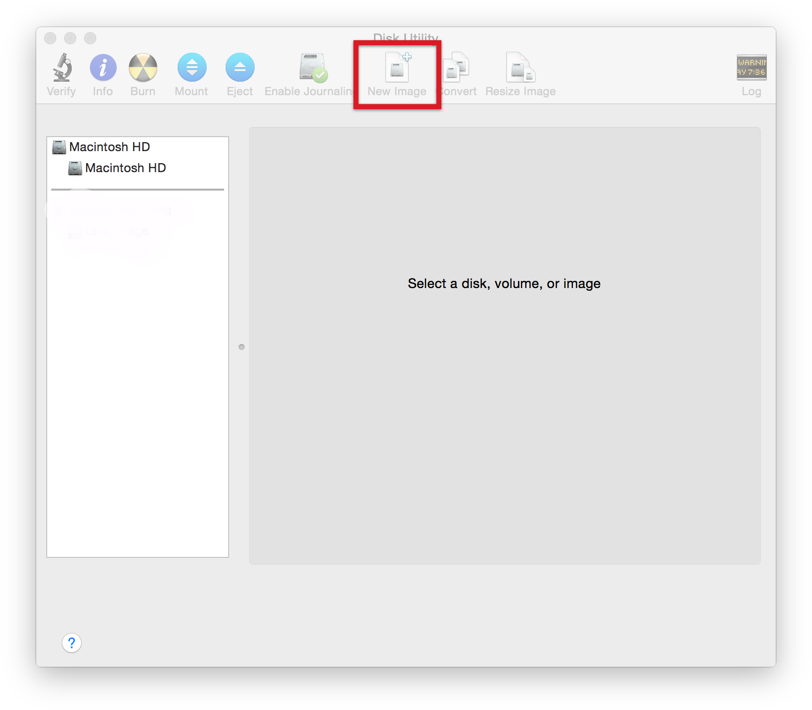
Or using Disk Utility in the GUI:
Open Disk Utility and click the new image button.
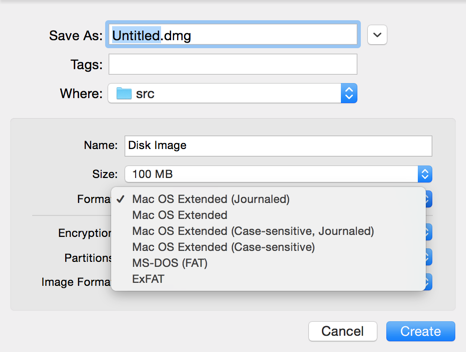
 Then select a case sensitive file format.
 ## Bonus Points, symlinking the mounted volume
If you do not know what [symlinks](https://en.wikipedia.org/wiki/Symbolic_link) are then I suggest you read up on that. In short, all files are some sort of symlink. All files need at least one [hard link](https://en.wikipedia.org/wiki/Hard_link), but we are going to make a soft link. A soft link is like a shortcut to a file or directory. It will look and act like a file or directory but it is actually pointing to a hard link of another file or directory.
```bash
$ ln -s /Volumes/Disk\\ Image/project-folder local-project-folder
```
This will create a [symlink](https://en.wikipedia.org/wiki/Symbolic_link) (that looks like a local directory) to our mounted volume in our current directory.
With this setup you get the best of both worlds: a case-sensitive file system for your project and a workflow that looks and feels exactly like working from your normal directory. No more surprises when deploying files to a case-sensitive server.
## Bonus Points, symlinking the mounted volume
If you do not know what [symlinks](https://en.wikipedia.org/wiki/Symbolic_link) are then I suggest you read up on that. In short, all files are some sort of symlink. All files need at least one [hard link](https://en.wikipedia.org/wiki/Hard_link), but we are going to make a soft link. A soft link is like a shortcut to a file or directory. It will look and act like a file or directory but it is actually pointing to a hard link of another file or directory.
```bash
$ ln -s /Volumes/Disk\\ Image/project-folder local-project-folder
```
This will create a [symlink](https://en.wikipedia.org/wiki/Symbolic_link) (that looks like a local directory) to our mounted volume in our current directory.
With this setup you get the best of both worlds: a case-sensitive file system for your project and a workflow that looks and feels exactly like working from your normal directory. No more surprises when deploying files to a case-sensitive server.